3. AWS S3 and EC2
Note
AWS cannot delete a S3 bucket when it has some data in it
we need to empty the bucket first then delete also we will get not get the bill for empty bucket
1. What is Amazon S3?
- Managed cloud storage service by AWS, storing data as objects in buckets.
- Objects can be any file (documents, images, videos), each with a unique object key.
- Designed for 99.999999999% durability (11 9s).
This extremely high durability means that if you store 10 million objects, you can expect to lose one object every 10,000 years on average. - Virtually unlimited storage; each object can be up to 5 TB.
2. Key Features
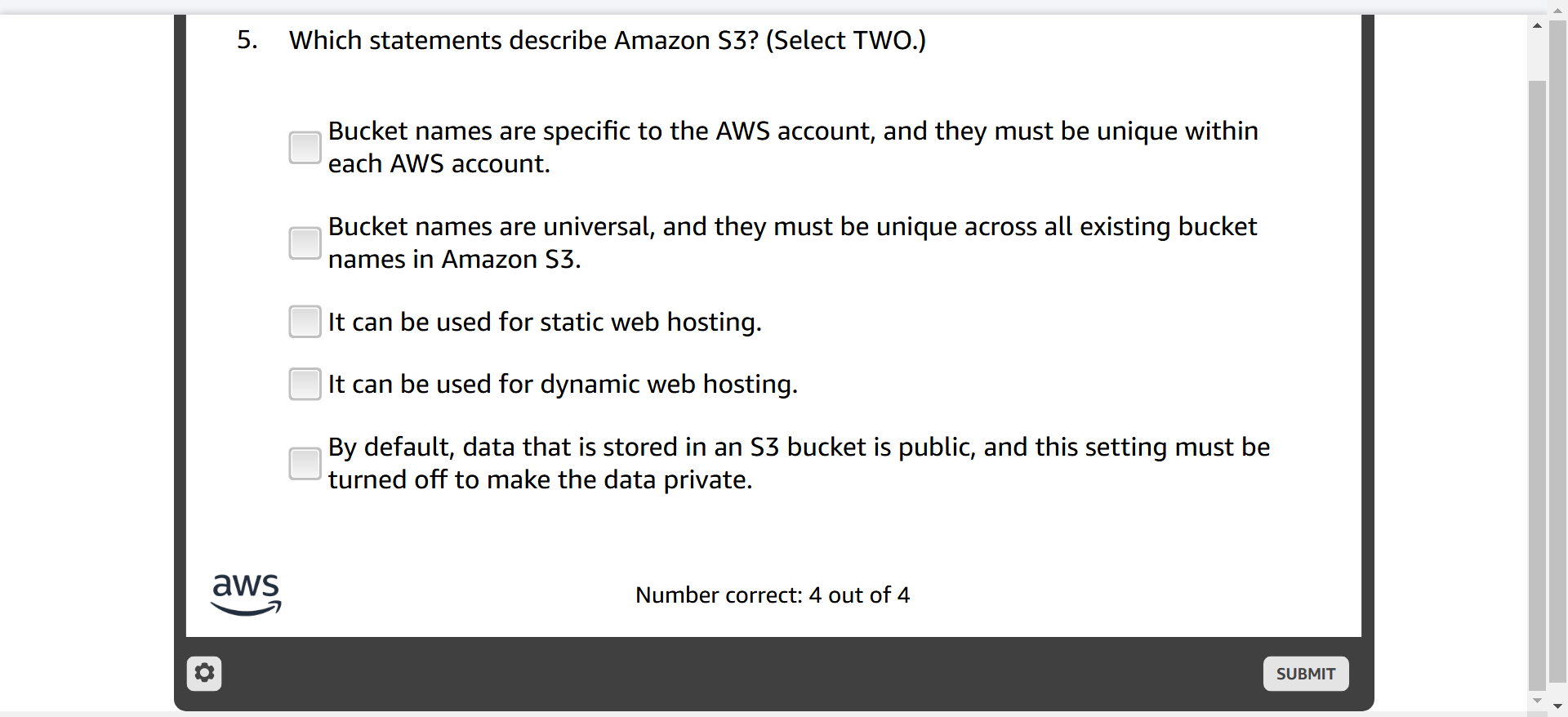
- Private by default: Data privacy controlled through access permissions.
- Stores data redundantly across multiple facilities.
- Access data from anywhere via HTTP/HTTPS.
- Globally unique bucket names.
- Integration with AWS services, accessed through:
- AWS Management Console
- AWS CLI
- AWS SDKs
- REST API endpoints
- The Bucket names should be unique
3. Amazon S3 Storage Classes
- Amazon S3 Standard: General-purpose storage for frequently accessed data.
- Amazon S3 Intelligent-Tiering: Auto-moves data to lower-cost tiers when access drops.
- Amazon S3 Standard-IA (Infrequent Access): For less frequently accessed but readily available data.
- Amazon S3 One Zone-IA: Low-cost, single-AZ storage for infrequent data access.
- Amazon S3 Glacier: Affordable data archiving with variable retrieval times.
- Amazon S3 Glacier Deep Archive: Lowest-cost storage for long-term data retention with 12-hour retrieval.
| Storage Class | Durability | Availability | Use Case Example | Cost | Retrieval Time | Additional Cost Considerations |
|---|---|---|---|---|---|---|
| S3 Standard | 11 9s | 4 9s | Frequently accessed data | $$$ | Immediate | None |
| S3 Intelligent-Tiering | 11 9s | 3 9s / 4 9s | Unpredictable access patterns | $$ | Immediate | Monitoring fee per object |
| S3 Standard-IA | 11 9s | 3 9s | Infrequently accessed, rapid access | $ | Immediate | Retrieval fees apply |
| S3 One Zone-IA | 11 9s | 2 9s | Secondary backups, less critical data | $ | Immediate | Retrieval fees and single-AZ risk |
| S3 Glacier | 11 9s | Not stated | Long-term archival, flexible access | $ (cheap) | Minutes to hours | Retrieval fees, options for expedited access |
| S3 Glacier Deep Archive | 11 9s | Not stated | Rarely accessed, very long-term retention | $ (cheapest) | Hours to days | Retrieval fees, lowest-cost storage |
4. Access & URLs
- Data Access Methods: AWS Console, CLI, SDKs, REST endpoints.
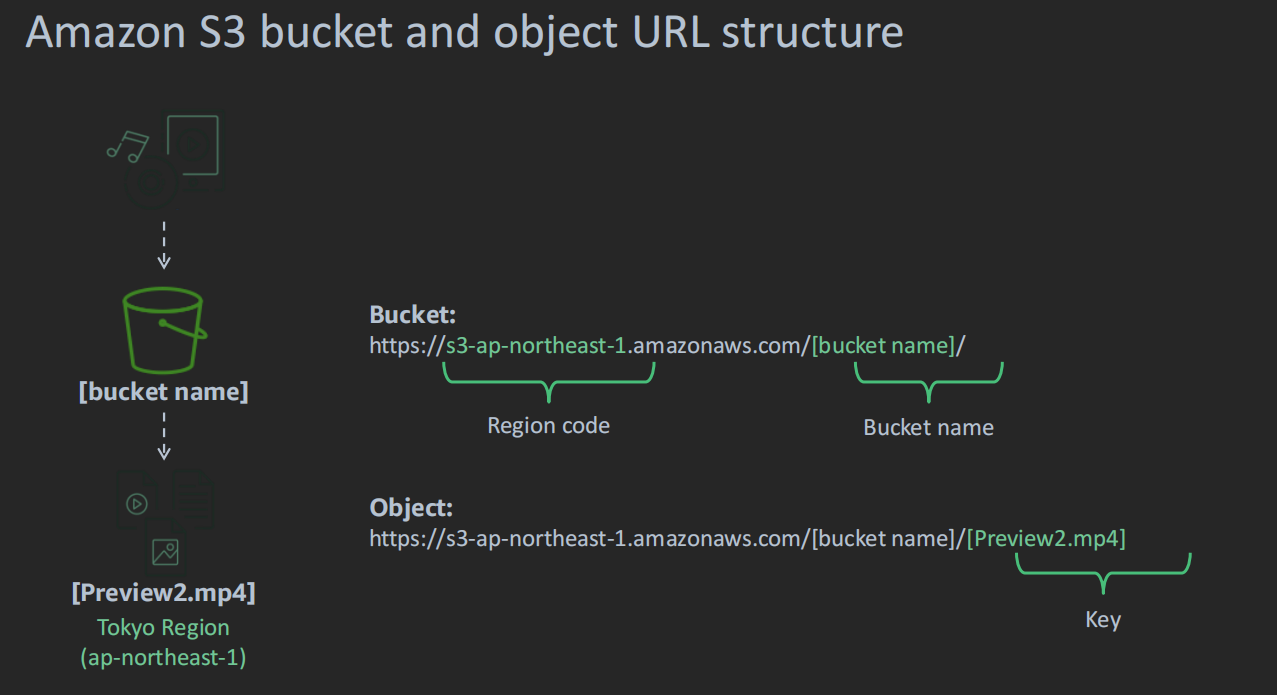
- URL Structure:
- Format:
https://[bucket name].s3.[region].amazonaws.com/[object key] - Example: Bucket in Tokyo region:
- URL:
https://my-bucket.s3.ap-northeast-1.amazonaws.com/my-object.jpg
- URL:
- Format:
- URLs are Region-specific, ensuring data locality.
5. Data Redundancy & Durability
- Data stored across multiple facilities in the selected Region.
- Built to withstand loss of two facilities without data loss.
6. Scaling & Performance
- Auto-scales to accommodate data growth.
- No provisioning of storage or throughput required.
- Charges based on usage.
7. Common Use Cases
- Application Assets Storage: Common storage for application files.
- Static Web Hosting: Host static websites with HTML, CSS, JS.
- Backup & Disaster Recovery: Reliable backup storage with high durability.
- Big Data Analytics: Scalable storage for big data workflows.
8. Amazon S3 Pricing
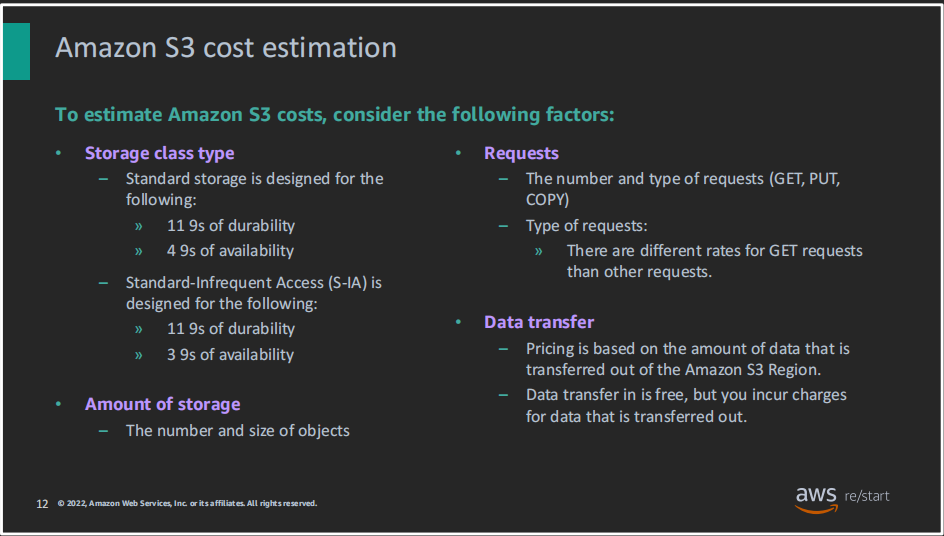
- Pricing based on:
- Storage Usage: Cost per GB per month for each storage class.
- Data Transfer: Charges for data transfer out of AWS Regions.
- Operations: PUT, GET, LIST, and COPY operations.
- Free of Charge:
- Data transferred into Amazon S3.
- Transfers out to CloudFront or EC2 within the same Region.
9. Cost Factors
- Storage Class: Costs differ for Standard, IA, Glacier, etc.
- Amount of Data: Number and size of stored objects.
- Request Types: Charges for API operations like GET, PUT, COPY.
- Data Transfer: Free inbound; charges for outbound to different Regions.
EC2 (Elastic compute cloud)
- Cloud VMs: Virtual machines (EC2 instances) in the AWS Cloud for scalable computing.
- Guest OS Control: Full control over Windows or Linux operating systems.
- Elastic Scaling: Easily scale the number and size of instances to meet demand.
- Quick Deployment: Launch instances quickly from AMIs across global regions.
- Traffic Management: Use security groups to control inbound and outbound traffic.
- EC2 = IaaS: Provides complete control over OS and infrastructure (Infrastructure as a Service).
AWS Compute Categories
- VMs: EC2 and Lightsail provide virtual servers.
- Containers: Amazon ECS for Docker containers, Fargate for serverless containers.
- PaaS: Elastic Beanstalk simplifies app deployment without managing infrastructure.
- Serverless: AWS Lambda runs code without provisioning or managing servers.
- Specialized: AWS Outposts for on-premises infrastructure, AWS Batch for large-scale batch jobs.
Key EC2 Concepts
! 500
- AMI (Amazon Machine Images): Pre-configured templates for launching instances with OS and software.
- Types: Quick Start (AWS defaults), My AMIs (your custom images), AWS Marketplace (third-party apps), Community AMIs (user-shared, be cautious).
- Instance Types: Define CPU, memory, and storage, optimized for different workloads.
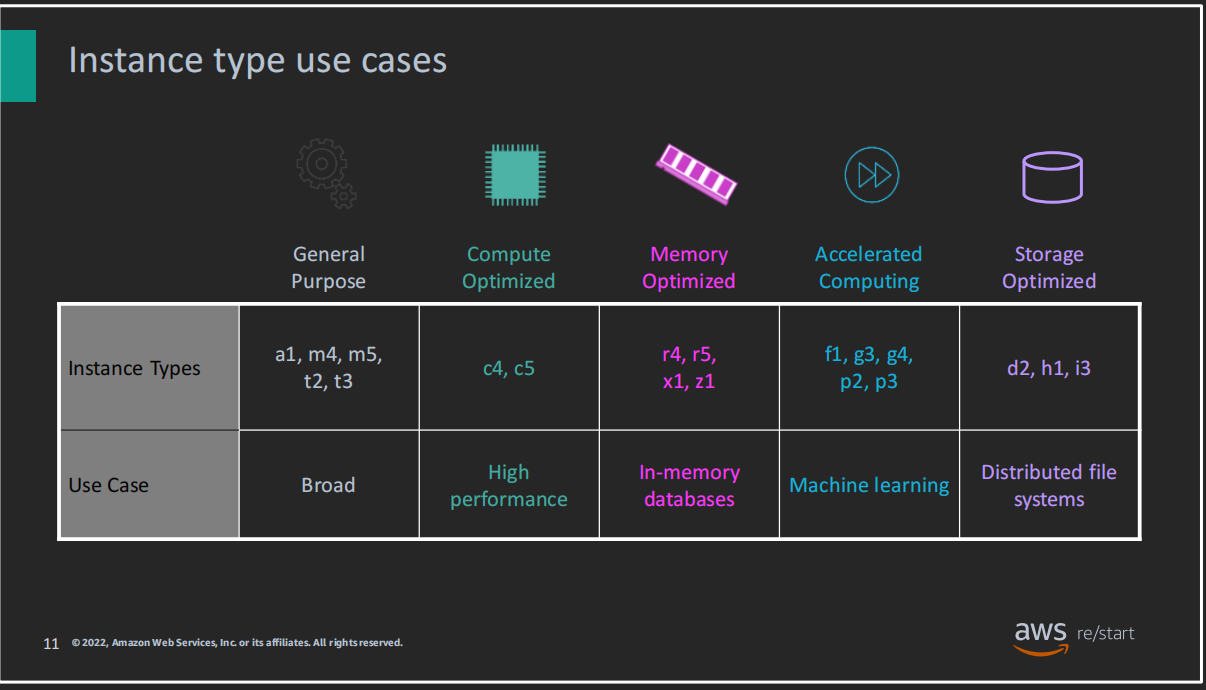
- Categories: General Purpose, Compute Optimized, Memory Optimized, Storage Optimized, Accelerated Computing (GPU-based).
- Security Groups: Virtual firewall to control traffic to/from EC2 instances.
- Key Pairs: Public/Private key pairs for secure SSH access to EC2 instances.
Steps to Launch an EC2 Instance
- Select an AMI: Choose a pre-built or custom AMI that matches your app requirements.
- Choose an Instance Type: Select based on CPU, memory, and performance needs.
- Configure Network Settings: Set VPC, subnet, and public IP (if needed).
- Attach an IAM Role (Optional): Add permissions to allow instance access to other AWS services.
- Add a User Data Script (Optional): Customize the instance setup, like installing software.
- Specify Storage: Set up root and additional volumes (EBS storage).
- Add Tags: Use tags to organize and identify instances for management.
- Configure Security Groups: Set rules for inbound/outbound traffic.
- Select or Create a Key Pair: Secure access to the instance using the key pair.
EC2 Instance Lifecycle States
- Pending: Instance is being launched.
- Running: Instance is live and operational.
- Rebooting: Instance is rebooting.
- Shutting Down: Instance is in the process of shutting down.
- Terminated: Instance has been permanently deleted.
- Stopping: Instance is being stopped (can be restarted).
- Stopped: Instance is stopped but can be started again.
EC2 Pricing Models
- On-Demand: Pay by the hour/second without long-term commitment.
- Reserved: Save money by reserving instances for 1-3 years at a discounted rate.
- Spot: Bid on unused capacity at lower rates, with possible interruptions.
- Dedicated Hosts: Rent entire physical servers, ideal for specific licensing requirements.
- Dedicated Instances: Isolated from other customers’ instances at the hardware level.
reference -
Instance Naming Convention and types
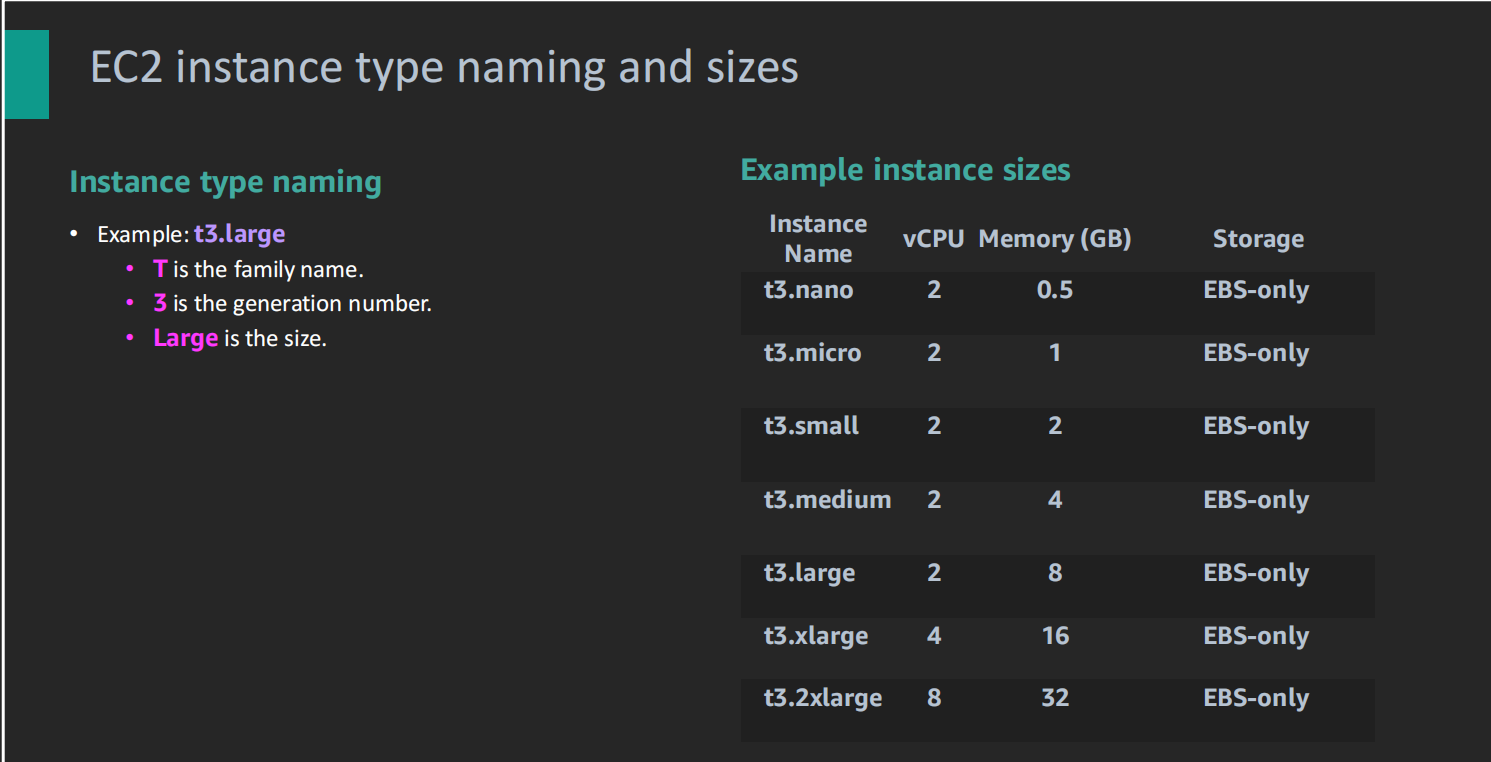
- Example:
t3.micro– ‘T’ for General Purpose, ‘3’ for generation, ‘micro’ for instance size.- T3 Micro: 2 vCPUs, 1 GB memory (light apps).
- T3 Small: 2 vCPUs, 2 GB memory (moderate apps).
Note: T3 instances can burst CPU usage beyond the baseline when needed.
Note
EC2 is a IAAS, user has whole access to the OS
answer
2,3