3.Express
Express.js is a lightweight framework that helps you create web servers and handle HTTP requests and responses in Node.js. It provides a flexible way to build web applications, APIs, and microservices.
Key Features of Express.js
- Request and Response Objects: Express.js provides a
req(request) object and ares(response) object, which allow you to access and manipulate HTTP requests and responses. - Routing: Express.js allows you to define routes, which map URLs to specific handlers. This enables you to handle different HTTP requests (e.g., GET, POST, PUT, DELETE) and respond accordingly.
- Middleware: Express.js has a built-in middleware system, which enables you to perform tasks such as authentication, logging, and error handling.
- Template Engine: Express.js supports various template engines (e.g., EJS, Jade, Pug) to render dynamic HTML templates.
1. Setting Up Express
To get started, install Express with npm:
npm install express
Then, require it in your app.js (or any other main file):
const express = require('express');
const app = express();
The difference between const express = require('express'); and import express from 'express'; lies in module syntax:
require()is CommonJS syntax, used in older Node.js versions and is the default in many Node.js projects.importis ES6 (ESM) syntax, newer and typically used in modern JavaScript (and in Node.js with"type": "module"inpackage.json).
- CommonJS (
require): Works without additional configuration in most Node.js setups. - ESM (
import): Offers more features (likeimport/exportnatively in browsers) and is becoming the standard but may need"type": "module"in Node.js projects.
2. Basic Server Setup
You can set up a basic server that listens on a specific port:
app.listen(3000, () => {
console.log('Server is running on port 3000'); });
Here, Express runs the server on localhost:3000.
3. Routing
Express allows you to define routes for handling different HTTP requests.
- Basic Route:
app.get('/', (req, res) => {
res.send('Hello, World!'); });
- **Route Parameters**:
	```js
	app.get('/users/:id', (req, res) => {
	const userId = req.params.id;
	res.send(`User ID is ${userId}`); });
req (Request Object)
The req object represents the HTTP request sent by the client to the server. It contains information about the request, such as:
- URL: The URL of the request (e.g.,
/) - Method: The HTTP method used (e.g.,
GET,POST, etc.) - Headers: The HTTP headers sent by the client (e.g.,
Accept,Content-Type, etc.) - Query: The query string parameters (e.g.,
?name=John&age=30) - Body: The request body (e.g., JSON data sent in a
POSTrequest)
You can access these properties and methods using the req object, for example:
app.get("/", (req, res) => {
console.log(req.url); // Output: "/"
console.log(req.method); // Output: "GET"
console.log(req.headers); // Output: { ... }
console.log(req.query); // Output: { ... }
console.log(req.body); // Output: { ... } });
res (Response Object)
The res object represents the HTTP response sent by the server to the client. It contains methods for sending responses, such as:
- send(): Sends a response with a string or buffer
- json(): Sends a response with JSON data
- status(): Sets the HTTP status code of the response
- header(): Sets a response header
- redirect(): Redirects the client to a different URL
You can use these methods to send responses to the client, for example:
app.get("/", (req, res) => {
res.send("This is Home page"); // Send a string response
res.json({ message: "Hello World" }); // Send a JSON response
res.status(404).send("Not Found"); // Send a 404 response
res.header("Content-Type", "text/html"); // Set a response header
res.redirect("/login"); // Redirect to a different URL });`
What is Middleware in Express JS?
Middleware is a function that runs between the request and response in an Express application. It allows you to intercept and modify requests and responses before they reach the route handlers.
The basic syntax for the middleware functions is
app.use((req, res, next) => {
  console.log('Middleware executed!');
  next(); // Proceeds to the next middleware/route
});
Middleware functions take 3 arguments: the *request object, the response object, and the *next function in the application’s request-response cycle, i.e., two objects and one function.
Types of Middleware
Express JS offers different types of middleware and you should choose the middleware on the basis of functionality required.
- *Application-level middleware: Bound to the entire application using app.use() or app.method and executes for all routes.
- outer-level middleware: Associated with specific routes using router.use() or router.method and executes for routes defined within that router.
- Error-handling middleware:* Handles errors during the request-response cycle. Defined with four parameters (err, req, res, next).
- *Built-in middleware: Provided by Express (e.g., express.static, express.json, etc.).
- Third-party middleware: Developed by external packages (e.g., body-parser, morgan, etc.).
Middleware Error Handling
In Express, an error-handling middleware function has four parameters: err, req, res, and next. This middleware is triggered whenever an error occurs in your application.
app.use((err, req, res, next) => {
console.error(err.stack); // Logs the error stack trace
res.status(500).send('Something went wrong!'); });
err: Contains error details.reqandres: Represent the request and response objects.next: Passes control to the next middleware in the chain (if necessary).
Nodemon
Nodemon is a tool that helps develop Node.js applications by automatically restarting the server when changes are made to the code.
npm install express nodemon
To Run the server using Nodemon
npx nodemon script.js
Rough notes from lecture
middle ware
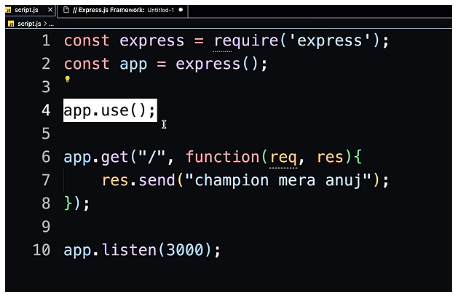
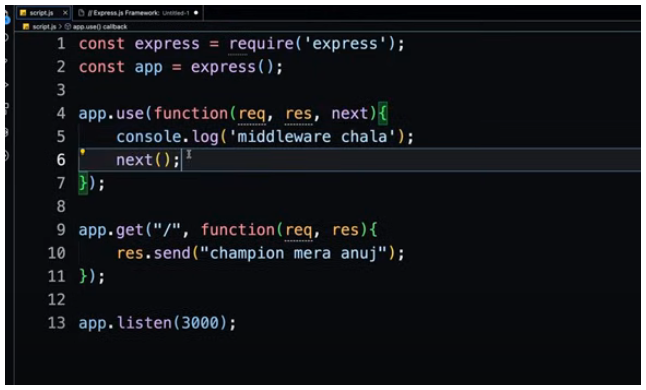
app.use() is a middle ware when the client hits the / to route to the page before the request goes to server it firsts goes to app.use() where we ca run any function in it
but now if we only run app.use() it will run the function but it will not push the route below to '/' so we use next as a parameter after performing all the functions and queries in app.use() we write next() just like return parameter which forwards it to the next route asked by the client
error handling
express app.use has some default error handling
for frontend
app.use((err,req,res,next)=>{
	console.error(err.stack)
	res.status(500).send('something broke')
})