unit 4
1. Explain the concept of columnar databases and their advantages.
Answer:
A columnar database stores data column wise instead of row wise. In traditional row databases, complete rows are stored together. In columnar databases, values of a single column are stored together.
Example:
Row storage
1, John, 20
2, Ravi, 22
Column storage
ID column: 1, 2
Name column: John, Ravi
Age column: 20, 22
Advantages:
-
Faster query performance
Queries that access only few columns read only required columns, which improves speed. -
Better compression
Similar data stored together can be compressed efficiently. -
Efficient for analytics
Aggregate functions like SUM, COUNT, AVG work faster on columns. -
Reduced I/O
Only required columns are read from disk.
Thus, columnar databases are mainly used in data warehousing and big data analytics.
2. Describe the architecture of HBase with a neat diagram.
Answer:
Apache HBase is a distributed NoSQL database built on top of Hadoop HDFS. It provides real time read and write access to large datasets.
Main components:
-
HMaster
Manages the cluster. Assigns regions to RegionServers and handles load balancing. -
RegionServer
Stores and manages regions (portions of tables). Handles read and write requests. -
HDFS
Stores actual data files. -
ZooKeeper
Coordinates distributed services and maintains configuration information.
Neat diagram (text representation):
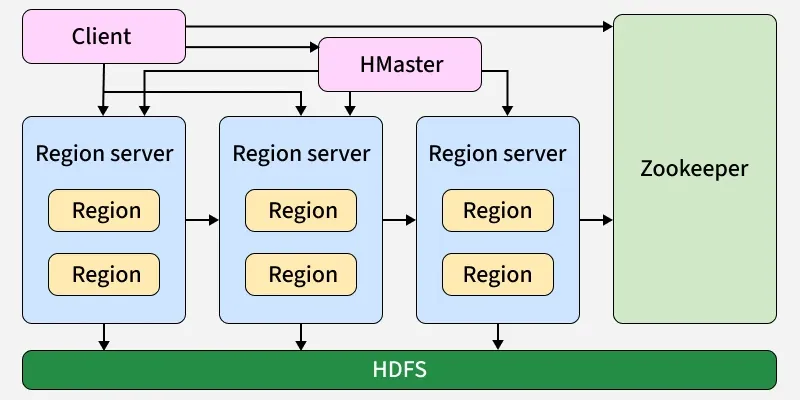
Working:
-
Table is divided into regions.
-
Regions are distributed across RegionServers.
-
Data is stored in HDFS.
-
HMaster manages metadata and cluster operations.
Thus, HBase architecture supports scalable and fault tolerant distributed storage.
3. Explain the role of HMaster in HBase.
Answer:
Apache HBase uses HMaster as the master node of the cluster.
Role of HMaster:
-
Cluster management
It manages the overall HBase cluster and monitors RegionServers. -
Region assignment
It assigns regions (table partitions) to different RegionServers. -
Load balancing
It distributes regions evenly among RegionServers to maintain performance. -
Handling schema changes
It manages creation, deletion, and modification of tables and column families. -
Failure handling
If a RegionServer fails, HMaster reassigns its regions to other servers.
Note: HMaster does not handle read and write operations directly. Client requests go directly to RegionServers.
Thus, HMaster acts as the coordinator and controller of the HBase cluster.
4. Describe Region Server and its responsibilities.
Answer:
In Apache HBase, RegionServer is the worker node that handles actual data operations.
Responsibilities of RegionServer:
-
Data storage
It manages regions, which are subsets of HBase tables. -
Read and write operations
Handles client requests for inserting, updating, deleting, and retrieving data. -
Region management
Splits regions when they grow large and manages region files. -
Communication with HDFS
Stores and retrieves data from HDFS. -
Reporting to HMaster
Sends heartbeat signals and status updates.
Thus, RegionServer is responsible for storing data and performing all data related operations in HBase.
5. Explain ZooKeeper and its coordination role in HBase.
Answer:
Apache ZooKeeper is a distributed coordination service used in Apache HBase to manage and synchronize cluster components.
Role in HBase:
-
Master election
If multiple HMaster nodes exist, ZooKeeper selects one active master. -
Server coordination
Keeps track of live RegionServers. -
Failure detection
Detects failed RegionServers through heartbeat mechanism. -
Configuration management
Stores cluster configuration and metadata information. -
Client redirection
Helps clients locate correct RegionServer for data access.
Thus, ZooKeeper ensures proper coordination and high availability in HBase cluster.
6. Discuss advantages and disadvantages of HBase.
Answer:
Advantages of HBase:
-
Scalability
Can handle very large datasets by adding more nodes. -
High availability
Provides fault tolerance using HDFS replication. -
Real time read and write
Supports fast random access to big data. -
Flexible schema
Allows dynamic addition of columns. -
Suitable for sparse data
Stores only non empty columns, saving storage.
Disadvantages of HBase:
-
Complex setup
Requires Hadoop and ZooKeeper configuration. -
Not suitable for complex queries
Does not support SQL like joins easily. -
High resource usage
Needs significant memory and hardware. -
Limited transaction support
Supports row level transactions only.
Thus, HBase is powerful for large scale real time applications but has complexity and query limitations.
7. Explain HBase data model and storage structure.
Answer:
Apache HBase is a column oriented NoSQL database built on HDFS.
HBase data model:
-
Table
Data is stored in tables. -
Row
Each table consists of rows identified by a unique row key. -
Column family
Columns are grouped into column families. Column families must be defined at table creation. -
Column qualifier
Actual column names inside a column family. -
Cell
Intersection of row and column. Each cell contains value and timestamp.
Structure example:
RowKey | ColumnFamily:Qualifier | Value | Timestamp
Storage structure:
-
Table is divided into regions.
-
Regions are distributed across RegionServers.
-
Data is stored in HFiles in HDFS.
-
Write operations first go to Write Ahead Log (WAL) for reliability.
-
Data is stored temporarily in MemStore and later flushed to HFiles.
Thus, HBase stores data in a distributed, column oriented and fault tolerant manner.
8. Describe HBase shell commands and their usage.
Answer:
HBase shell is used to interact with HBase through command line.
Important commands:
-
create
Creates a table.
Example: create 'student', 'info' -
list
Displays all tables.
Example: list -
put
Inserts data into table.
Example: put 'student', '1', 'info:name', 'John' -
get
Retrieves data for a row.
Example: get 'student', '1' -
scan
Displays all rows in table.
Example: scan 'student' -
delete
Deletes specific cell value.
Example: delete 'student', '1', 'info:name' -
drop
Deletes a table (after disabling).
Example: disable 'student'
drop 'student'
These commands help manage tables and perform data operations in HBase.
9. Explain DDL commands in HBase with examples.
Answer:
DDL (Data Definition Language) commands in Apache HBase are used to define and manage table structure.
Important DDL commands:
-
create
Creates a new table with column families.
Example: create 'employee', 'info', 'salary' -
list
Displays all existing tables.
Example: list -
describe
Shows table structure and column families.
Example: describe 'employee' -
alter
Modifies table structure such as adding column family.
Example: alter 'employee', NAME => 'address' -
disable
Disables a table before deleting or altering.
Example: disable 'employee' -
drop
Deletes a table (must be disabled first).
Example: drop 'employee'
These commands are used to define and modify HBase tables.
10. Describe DML commands and query operations in HBase.
Answer:
DML (Data Manipulation Language) commands in Apache HBase are used to insert, update, retrieve, and delete data.
Important DML commands:
-
put
Inserts or updates data in a table.
Example: put 'employee', '1', 'info:name', 'Ravi' -
get
Retrieves data of a specific row using row key.
Example: get 'employee', '1' -
scan
Displays multiple rows from a table.
Example: scan 'employee' -
delete
Deletes a specific column value.
Example: delete 'employee', '1', 'info:name' -
deleteall
Deletes entire row.
Example: deleteall 'employee', '1'
Query operations in HBase are mainly based on row key. It supports fast random read and write but does not support complex SQL queries like joins.
Thus, DML commands are used to perform data operations in HBase tables.
11. Discuss security commands and access control in HBase.
Answer:
Apache HBase provides security using authentication and authorization mechanisms.
Security in HBase mainly includes:
-
Authentication
Verifies user identity. HBase commonly uses Kerberos for secure login. -
Authorization
Controls what actions a user can perform on tables.
Access control commands:
-
grant
Gives specific permissions to a user.
Example: grant 'user1', 'RW', 'employee'
Here R = Read, W = Write, X = Execute, C = Create, A = Admin. -
revoke
Removes permissions from a user.
Example: revoke 'user1', 'employee' -
user_permission
Displays permissions of users.
Example: user_permission 'employee' -
enable/disable table
Used to control access before performing administrative tasks.
Access control levels:
-
Global level (entire cluster)
-
Table level
-
Column family level
-
Column qualifier level
Thus, HBase ensures secure data access using authentication and fine grained authorization.
12. Explain graph databases and their importance in modern applications.
Answer:
A graph database is a type of database that stores data in the form of nodes, edges, and properties.
-
Node
Represents an entity such as person, product, or place. -
Edge
Represents relationship between nodes. -
Property
Stores information about nodes or edges.
Example:
Person A — friend — Person B
Here persons are nodes and friend is the relationship (edge).
Importance in modern applications:
-
Efficient relationship handling
Graph databases quickly process complex relationships. -
Real time recommendations
Used in social networks and recommendation systems. -
Fraud detection
Detects suspicious transaction patterns. -
Network analysis
Used in telecom and transportation systems.
Example: Neo4j is a popular graph database used for managing highly connected data.
Thus, graph databases are important for applications where relationships between data are more important than individual records.
13. Describe the graph data model in detail.
Answer:
The graph data model is a way of representing data using graph structures instead of tables. It focuses on relationships between data rather than storing data in rows and columns.
In a graph data model, data is represented using:
-
Nodes
Entities such as person, product, city, or account. -
Relationships (Edges)
Connections between nodes that show how they are related. -
Properties
Additional information stored with nodes or relationships.
Structure:
-
Data is stored as a network.
-
Each node can have multiple relationships.
-
Relationships are directly stored, not calculated using joins.
-
Relationships have direction and type.
Example:
Student — enrolled_in — Course
Teacher — teaches — Course
This model avoids complex joins because connections are stored directly.
Features of graph data model:
-
Flexible schema (no fixed table structure).
-
Efficient traversal of connected data.
-
Suitable for highly connected datasets.
Graph databases like Neo4j use this model to efficiently manage connected data.
Thus, the graph data model is ideal for applications where relationships are central to data analysis.
14. Explain nodes, relationships, and properties in graph databases.
Answer:
In graph databases, data is represented using three main components.
-
Nodes
Nodes represent entities or objects.
Example: A person, product, or company.
Each node has a unique identity. -
Relationships
Relationships connect two nodes and define how they are related.
They are directional and have a type.
Example: Person A — friend_of — Person B. -
Properties
Properties are key value pairs that store additional information.
Example:
Node property: name = "Ravi", age = 21
Relationship property: since = 2022
These three elements together form the structure of graph databases such as Neo4j.
Thus, nodes store entities, relationships connect them, and properties describe them in graph databases.
15. Discuss advantages of graph databases over relational databases.
Answer:
Graph databases are designed to handle highly connected data more efficiently than relational databases.
Advantages:
-
Better relationship handling
Graph databases store relationships directly, while relational databases use joins. This makes graph queries faster for connected data. -
High performance for traversal
Traversing multiple levels of relationships is efficient because connections are stored as links. -
Flexible schema
No fixed table structure. New node types or relationships can be added easily. -
Reduced complexity
No need for complex join queries. -
Suitable for real world networks
Best for social networks, recommendation systems, fraud detection, and network analysis.
Example:
Neo4j efficiently handles connected data compared to traditional relational databases.
Thus, graph databases are more suitable when relationships are central to the application.
16. Explain how nodes are created in a graph database.
Answer:
In a graph database, nodes represent entities such as person, product, or location.
Nodes are created using a query language provided by the graph database.
Example in Neo4j using Cypher query language:
CREATE (n:Person {name: 'Ravi', age: 21})
Explanation:
-
CREATE is the command to create a node.
-
Person is the label that defines node type.
-
name and age are properties stored as key value pairs.
Another example:
CREATE (:Product {id: 101, name: 'Laptop'})
Thus, nodes are created by defining a label and properties, and they become part of the graph structure.
17. Describe how relationships are created and managed between nodes.
Answer:
In graph databases, relationships connect two nodes and define how they are related. Relationships are directional and have a type.
Creation of relationships:
In Neo4j using Cypher query language:
MATCH (a:Person {name:'Ravi'}), (b:Person {name:'Amit'})
CREATE (a)-[:FRIEND_OF]->(b)
Explanation:
-
MATCH finds existing nodes.
-
CREATE defines a relationship between them.
-
FRIEND_OF is the relationship type.
-
Arrow shows direction.
Relationships can also have properties.
Example:
CREATE (a)-[:PURCHASED {date:'2024-01-10'}]->(p)
Management of relationships:
-
Relationships can be deleted using DELETE command.
-
They can be updated by modifying properties.
-
Graph databases maintain direct pointers between nodes, so traversal is fast.
Thus, relationships are explicitly stored and efficiently managed in graph databases.
18. Explain similarity analysis between nodes in graph databases.
Answer:
Similarity analysis measures how similar two nodes are based on their relationships or properties.
It is mainly used in recommendation systems and social networks.
Types of similarity:
-
Structural similarity
Nodes are similar if they share common neighbors.
Example: Two users who have many common friends. -
Property based similarity
Nodes are similar if their attributes are similar.
Example: Users with same interests or age group. -
Path based similarity
Nodes connected through similar paths are considered similar.
Graph databases like Neo4j support graph algorithms such as Jaccard similarity and cosine similarity to compute similarity between nodes.
Applications:
-
Friend recommendations
-
Product recommendations
-
Fraud detection
Thus, similarity analysis in graph databases helps find related entities based on connections and attributes.
19. Discuss real-world applications of graph databases.
Answer:
Graph databases are used where relationships between data are very important.
Real world applications:
-
Social networks
Used to manage connections like friends, followers, and groups. -
Recommendation systems
Suggest products, movies, or friends based on connected data. -
Fraud detection
Identifies suspicious patterns in financial transactions. -
Network and IT management
Analyzes network topology and detects failures. -
Knowledge graphs
Used in search engines to connect related information. -
Supply chain management
Tracks relationships between suppliers, products, and distributors.
Graph databases such as Neo4j are widely used in these applications due to efficient relationship handling.
Thus, graph databases are ideal for applications involving highly connected data.
20. Explain a Neo4j-based case study for graph data analysis.
Answer:
Case study: Social network analysis using Neo4j.
Scenario:
A company wants to analyze user connections to recommend new friends.
Data model:
-
Nodes: Person
-
Relationships: FRIEND_OF
-
Properties: name, age, city
Process:
-
Create nodes for each user with properties.
-
Create relationships between users who are friends.
-
Use graph algorithms to find mutual friends.
-
Apply similarity measures to suggest new connections.
Example query:
MATCH (a:Person)-[:FRIEND_OF]->(b:Person)-[:FRIEND_OF]->(c:Person)
WHERE a <> c
RETURN a, c
This query finds friends of friends for recommendation.
Outcome:
-
Identifies highly connected users.
-
Recommends potential friends.
-
Detects community clusters.
Thus, Neo4j helps analyze relationships and extract insights efficiently from connected data.