1. MongoDB
MongoDB
MongoDB is a popular NoSQL, document-oriented database that stores data in flexible, JSON-like documents rather than traditional rows and columns. This flexibility makes it ideal for handling large amounts of unstructured or semi-structured data.
To install mongodb
mongodb install
install the the mongo db shell that is mongosh as well
mongosh
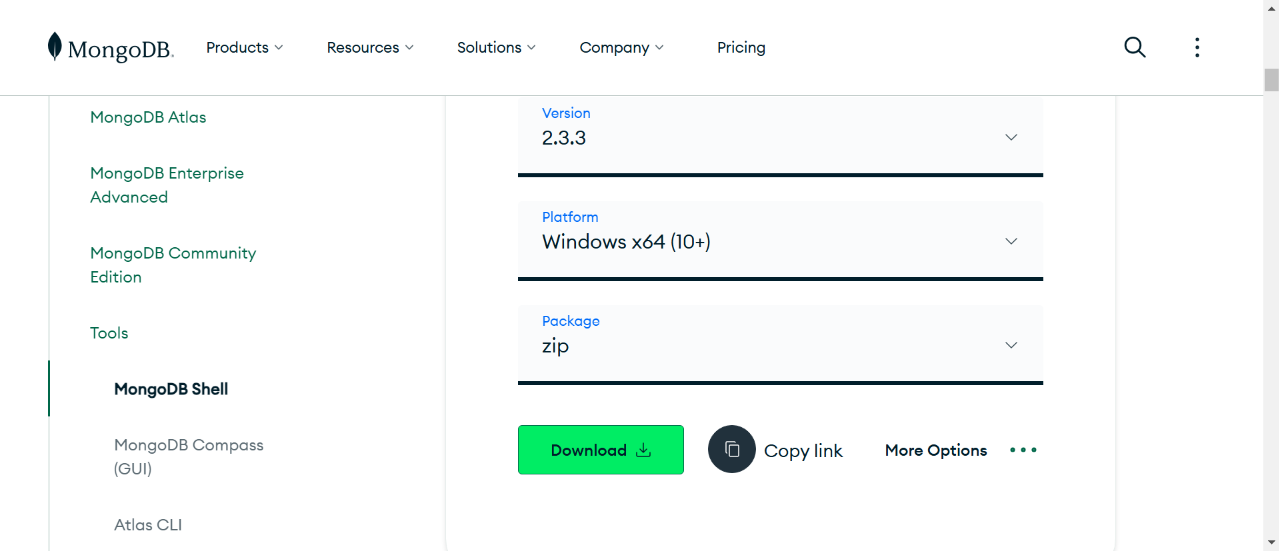
now after installing the the mongosh zip extract the zip
keep the extract in the documents folder for easy excess
now open the extract file youll find a app right click the app open properties and copy the path
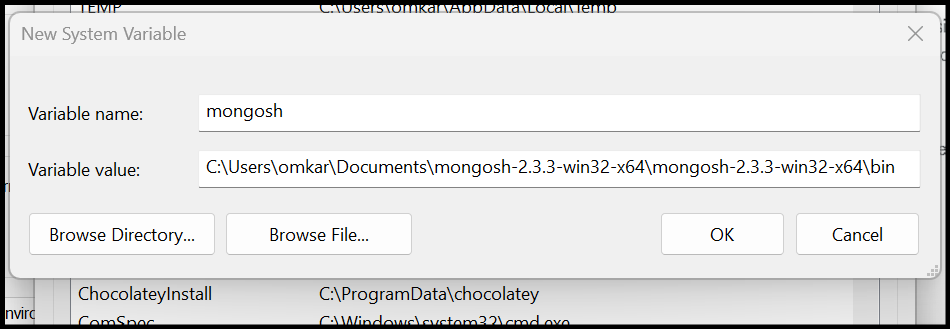
mine is
C:\Users\omkar\Documents\mongosh-2.3.3-win32-x64\mongosh-2.3.3-win32-x64\bin
now open environment variables and in the system varibales click on new and add path
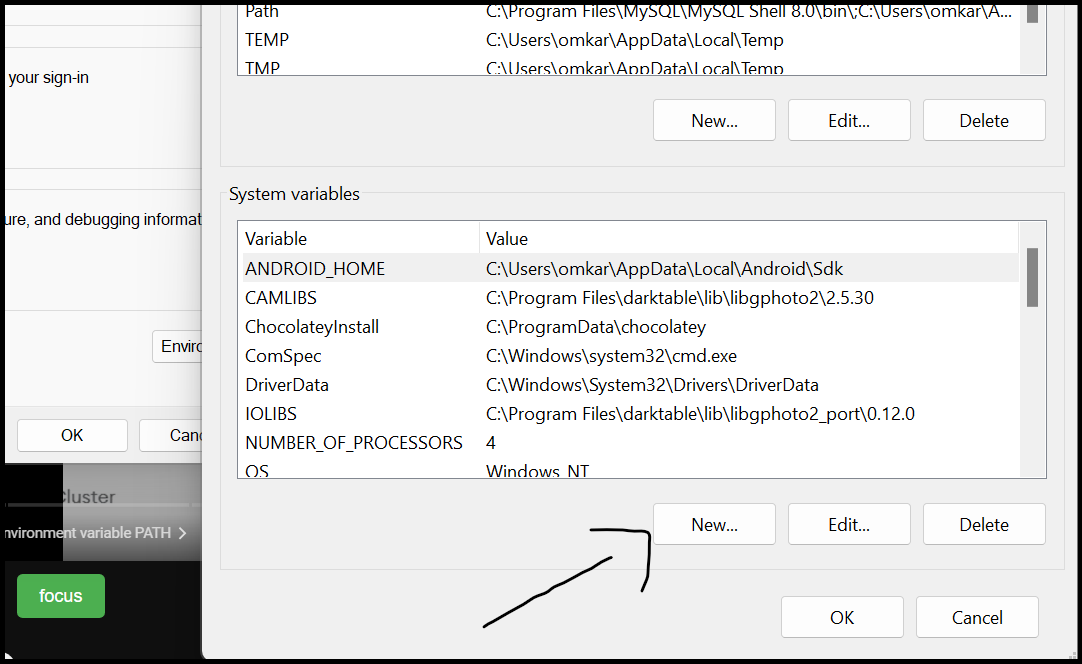
we can also use the mongo db in vs code just install the extension in vs code
| Description | Example |
|---|---|
| Show all databases. | show dbs |
Switch to or create a database named myDatabase. |
use myDatabase |
| Drop the current database. | db.dropDatabase() |
| Show all collections in the current database. | show collections |
Create a collection named myCollection. |
db.createCollection('myCollection') |
Drop the collection named myCollection. |
db.myCollection.drop() |
Insert a single document into myCollection. |
db.myCollection.insertOne({ name: 'John', age: 30 }) |
Insert multiple documents into myCollection. |
db.myCollection.insertMany([{ name: 'Jane', age: 25 }, { name: 'Doe', age: 40 }]) |
Retrieve all documents from myCollection. |
db.myCollection.find() |
| Find documents where age is greater than 20. | db.myCollection.find({ age: { $gt: 20 } }) |
Update the document where name is John. |
db.myCollection.updateOne({ name: 'John' }, { $set: { age: 31 } }) |
Delete the document where name is John. |
db.myCollection.deleteOne({ name: 'John' }) |
| Aggregate data based on age. | db.myCollection.aggregate([{ $match: { age: { $gt: 20 } } }, { $group: { _id: "$age", total: { $sum: 1 } } }]) |
| Get statistics about the current database. | db.stats() |
Get statistics about myCollection. |
db.myCollection.stats() |
Export myCollection to a JSON file. |
mongoexport --db myDatabase --collection myCollection --out output.json |
Import data from a JSON file into myCollection. |
mongoimport --db myDatabase --collection myCollection --file input.json |
MongoDB Key Concepts
-
Sorting and Limiting:
- Explanation: Sorting allows you to order the results based on specified fields. Limiting restricts the number of documents returned.
- Example:
db.collectionName.find().sort({ age: 1 }).limit(5); // Sort by age ascending and limit to 5 results
-
Find:
- Explanation: Used to retrieve documents that match specific criteria from a collection.
- Example:
db.collectionName.find({ age: { $gt: 25 } }); // Find all documents with age > 25
-
Update:
- Explanation: Modifies existing documents in a collection. You can update specific fields or replace the entire document.
- Example:
db.collectionName.updateOne({ name: "John" }, { $set: { age: 32 } });
-
Delete:
- Explanation: Removes documents from a collection. You can delete one document, many documents, or all documents based on the criteria.
- Example:
db.collectionName.deleteOne({ name: "Jane" });
-
Comparison Operators:
- Explanation: Operators like
$gt(greater than),$lt(less than),$eq(equal to) help filter data in queries. - Examples:
$gt: Greater than$lt: Less than$gte: Greater than or equal to$lte: Less than or equal to
db.collectionName.find({ age: { $gte: 25 } });
- Explanation: Operators like
-
Logical Operators:
- Explanation: Logical operators such as
$or,$and,$notare used to combine multiple conditions. - Example:
db.collectionName.find({ $or: [{ age: { $lt: 20 } }, { age: { $gt: 50 } }] });
- Explanation: Logical operators such as
-
Indexes:
- Explanation: Indexes improve query performance by allowing the database to locate and retrieve data faster. They are often created on fields that are frequently searched.
- Example:
db.collectionName.createIndex({ age: 1 }); // Creates an ascending index on the age field
-
Collections:
- Explanation: Collections are like tables in MongoDB, storing groups of documents with similar purposes. Each document in a collection can have different fields and structures.
- Example:
- Create a collection:
db.createCollection("users")
- Create a collection: