0. Project Structure
A proper industry level project structure to begin with
1. To initialize the Project
npm init - By doing npm init we intialize the project in the Current Working Directory, it generates a 'package.json' which contains meta data about the project such as the project's name, version, description, author, and license.
npm init
2. To install necessary packages for further development
-
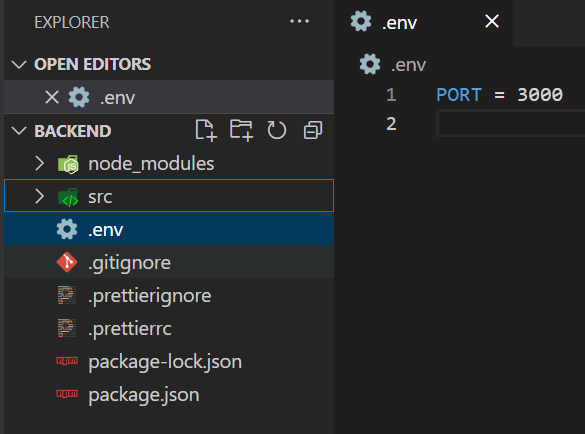
dotenv: it stores sensitive data such as your server running port number, database credentials, API keys, etc.
npm i dotenvonce you installed dotenv make a folder in your root directory .env like this
-
nodemon: it just refreshes your server on any file change once runed
npm i nodemonNow to Setup the nodemon in package.js*.
"scripts": { "dev": "nodemon -r dotenv/config --experimental-json-modules src/index.js" },nodemon: Runs the application with auto-restart on file changes.-r dotenv/config: Loads environment variables from the.envfile.--experimental-json-modules: Enables experimental support for JSON modules, which is useful if you're using ES modules and need to import JSON files like you can import and export.
- Now Start your Server by
npm run dev
-
Express: It is a Node.js Framework used used for building web applications and API, by providing routing, middleware, templating and handle HTTP request and responses.
npm install express -
Mongoose: It helps to connect MongoDB with your application
npm install mongoose
3. Setting the file Structure
backend/
 |- src/
	  |- controllers/ - (API endpoint handlers)
	  |- db/ - (database connection and schema)
	  |- middlewares/ - (request and response middleware functions)
	  |- models/ - (data models and schema definitions)
	  |- utils/ - (utility functions and helpers)
	  |- constant.js - (application-wide constants)
	  |- index.js - (main application entry point)
 |-.env - (environment variables and secrets)
 |-.gitignore - (files and folders to ignore in Git)
 |- package.json - (project metadata and dependencies)
 |- package-lock.json - (dependency tree and version locks)